Start Tracking an iPhone
There are two ways to install the phone tracker on an iPhone. Both install methods are explained in detail. Please follow the instructions below to install the mobile tracker app seamlessly on the target iphone device. Once the application is installed, you can view the tracking logs from your phone, computer or any internet connected device.

Supported Features:
- Invisible/discreet
- Unlimited Device Change
- SMS messages, Call History
- Spy WhatsApp Sent / Received Txt/Voice Messages
- Contacts
- Calendars, Notes, Reminders
- Wifi Networks
- Website History
- Installed Applications
- Keylogger (Needs Jailbreak)
- Incoming Call Blocking (Needs Jailbreak)
- Apps & Websites Blocking (Needs Jailbreak)
- Keyword Alerts (Needs Jailbreak)
- Emails History, Bookmarks (Needs Jailbreak)
- Photos & Videos (Needs Jailbreak)
- Remote Device Lock or Wipe (Needs Jailbreak)
- Keystrokes, Get Passwords (Needs Jailbreak)
- Sent / Received Txt/Voice Messages for Skype, Facebook, Viber, Tinder, Line, Telegram, Hangouts, Snapchat (Needs Jailbreak)
- GPS Locations/Geo Fencing (Needs Jailbreak)
- Sim Change Notification (Needs Jailbreak)
- Hidden Uninstall Alert (Needs Jailbreak)
How To Install Tracking App on iPhone/iPad in 3 Steps Without Physical Access (No-Jailbreak)
STEP 1
In this method, you won't need to download tracker app to target phone. Once you've submitted an order, your account for Cloud Panel will be sent to your email provided. Login to your Online Cloud Panel and activate the service.

STEP 2
Click on Menu --> Platform Selection --> Choose iPhone No Jailbreak at your panel.
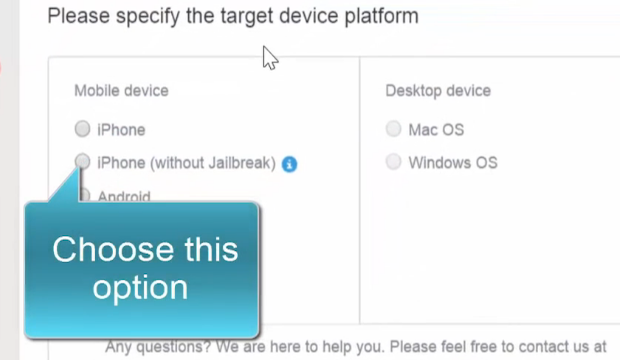
STEP 3
Enter the iCloud Username and Password of Target Phone. Wait for 30-60 minutes for the real time logs uploading. That's it, the app successfully installed remotely on target phone. Now you can view tracking logs of target iphone, no matter where it is.
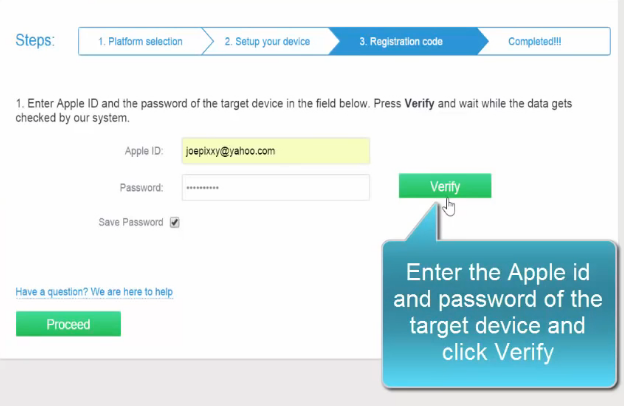
iCloud Backup Activation
In order to track iPhone without jailbreaking or installing the app without accessing target phone you will need to activate iCloud backup feature. Almost all iPhones have activated iCloud backup. But please make sure iCloud feature is enabled on target device. If the target phone does not have activated this feature you will have to take it and activate. The procedure is very simple. Here are instructions on how to activate iCloud backup in 3 steps;
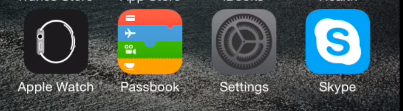
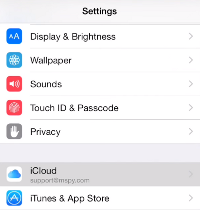
STEP 1 Go To Settings
First take the target iPhone device and select settings.
STEP 2 Find Backup Settings
Find and tap on iCloud to enable it backup setting. Tap on "iCloud" and then select "Backup".
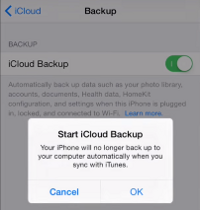
STEP 3 Turn Backup on
Turn the iCloud backup on and then press "OK" to confirm it. In few second it will turn on or it will ask you to enter the password and then it will turn on. After that it is recommended to tap on "Back Up Now" this will create a new backup but it is not necessary because after you activate this setting the phone will make a backup automaticaly in time.
Phone Monitoring with iCloud iOS Without Jailbreak
- Compatible with all iOS versions.
- It sends tracked data when the device connects internet.
- You do not need to have physical access to the target device if you already have its apple id login info.
- Still, the access may become necessary if iCloud backup feature isn't activated on the target device.
- Initial installation could perform by us if you don't have time for it.

Track an iPhone/iPad With Jailbreak
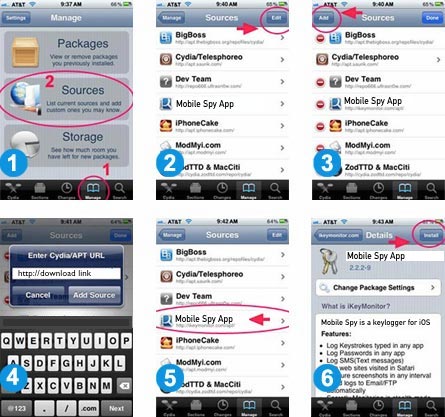
Installing the iPhone Monitoring app via jailbreak is another method. Please note that you will need to have physical access to target phone for this solution, but you will no need iCloud id info and target iOS version must be 7 to 14. Lets start!
STEP 1
Launch Cydia app first.
If you don't have cydia app on target iPhone, this means iPhone is not jailbroken.
You need to install Cydia, please click Here to Jailbreak and get Cydia for free.
If you don't have the time to jailbreak device yourself, you can simply click the "Add" button next to mAssistance Service during your order process, and we will do all process for you. Also it is possible to add our phone support service to your order.
STEP 2
How to determine iOS version:
Settingson the target device.
General.
About.
Version Number.
Our Location